How to Set Up a Position Tracking Campaign for Local SEO with SEMrush
Definition: A position tracking campaign in SEMrush monitors keyword rankings over time for a specific website, device type, search engine, and local geographic area.
Direct Answer: To set up a position tracking campaign for local SEO with SEMrush, create a new project, open Position Tracking, enter your domain, choose the correct local location, add your keywords, select mobile or desktop tracking, connect competitors, and monitor ranking changes weekly.
Many businesses track rankings incorrectly. Instead of monitoring local keywords in the actual city or ZIP area they serve, they often track national rankings that do not reflect real customer visibility.
However, local SEO depends heavily on location accuracy. Therefore, setting up SEMrush Position Tracking correctly is critical if you want meaningful local SEO data.
Additionally, local rank tracking helps businesses measure:
- Google Maps visibility
- Organic keyword movement
- Competitor rankings
- Mobile search performance
- Featured snippet ownership
- Local SEO campaign progress
- Search visibility trends
If you want to follow along with SEMrush, use this link: Try SEMrush Here.
Key Takeaways
- Local SEO tracking must use the correct city or geographic target.
- Additionally, mobile rankings matter heavily for local search visibility.
- SEMrush Position Tracking helps monitor local keyword movement daily.
- Tracking competitors helps identify local ranking opportunities.
- Therefore, accurate setup improves local SEO decision-making.
- Ultimately, local rank tracking helps connect SEO efforts to real visibility growth.
What Is SEMrush Position Tracking?
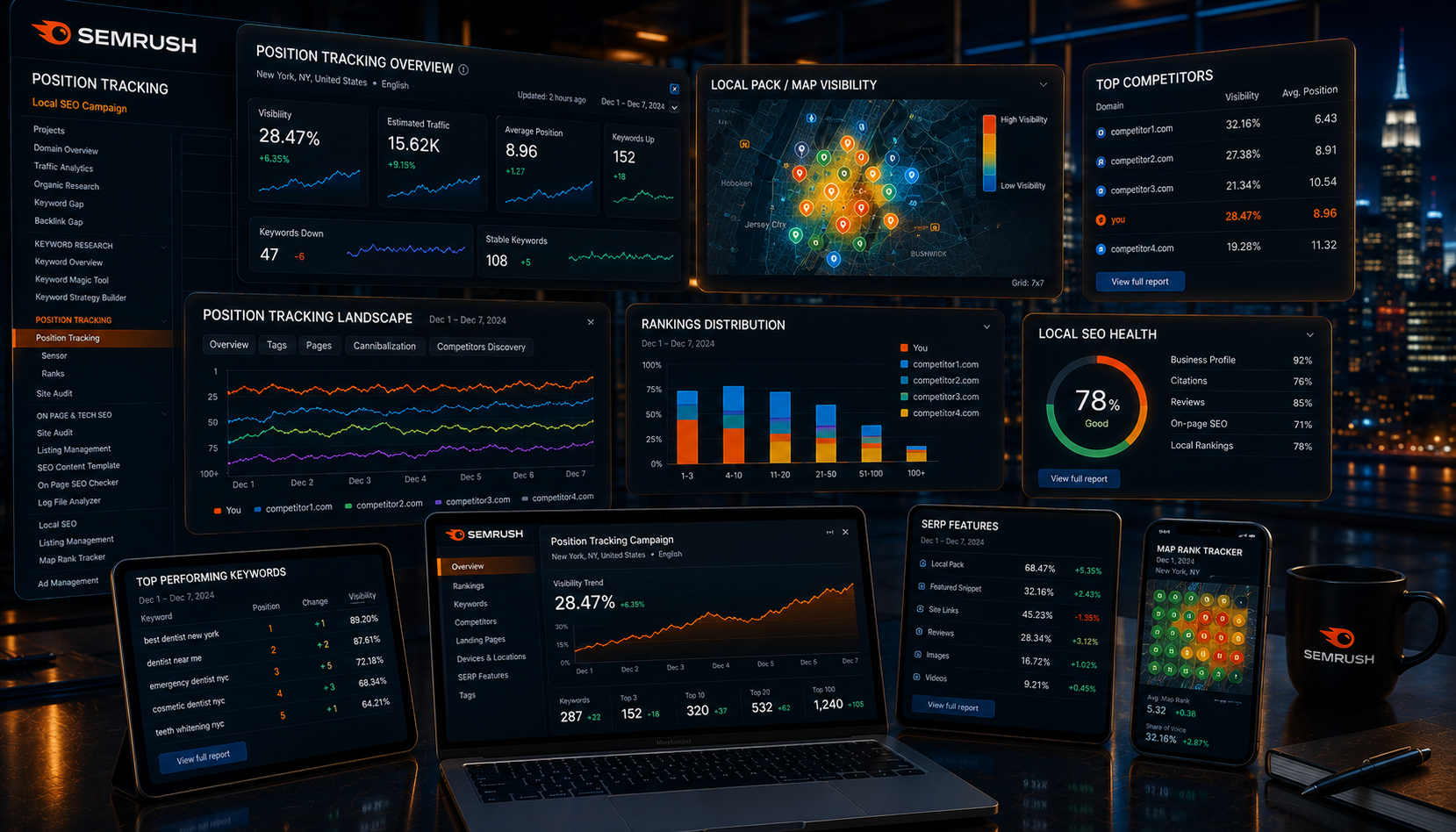
SEMrush Position Tracking is a keyword monitoring tool that tracks how your website ranks in Google over time.
However, unlike generic rank checkers, SEMrush allows you to track rankings based on:
- Specific cities
- ZIP codes
- Device type
- Search engine
- Competitors
- SERP features
- Local Maps visibility
SEMrush explains that Position Tracking monitors daily keyword rankings and visibility changes across custom locations and devices. SEMrush Position Tracking documentation
Therefore, it becomes one of the most important tools for local SEO campaigns.
Why Local SEO Position Tracking Matters
Local SEO rankings are different from national rankings. Because of that, a keyword may rank well nationally while performing poorly in the city where customers actually search.
For example:
- A roofing company in Cleveland may rank #4 nationally for a phrase.
- However, it may rank #21 inside Cleveland itself.
- Meanwhile, mobile rankings may differ from desktop rankings entirely.
Additionally, Google’s local algorithm heavily personalizes search results based on location and intent.
Google explains that local search results depend on relevance, distance, and prominence. Google local ranking factors
Therefore, accurate local tracking matters if you want realistic SEO data.
Before You Start Your Campaign
Before opening SEMrush, define the basics of your local SEO strategy.
Choose Your Core Information
- Your main city or service area
- Your target keywords
- Your competitors
- Your device priority
- Your business categories
- Your local landing pages
Additionally, separate informational keywords from buyer-intent keywords.
Examples of Buyer-Intent Local Keywords
- Akron roofing company
- Medina SEO agency
- Cleveland digital marketing agency
- Emergency plumber near me
- Local HVAC contractor
These keywords usually matter more because they indicate stronger commercial intent.
Step 1: Create a SEMrush Project
First, log into SEMrush and create a project.
How to Create the Project
- Open SEMrush.
- Go to the Projects section.
- Click “Create Project.”
- Enter your domain name.
- Name the project clearly.
For example:
- Akron SEO Campaign
- Cleveland Roofing SEO
- Dallas Local SEO Tracking
Additionally, clear project naming helps when managing multiple locations or clients later.
Step 2: Open Position Tracking
After creating the project, open the Position Tracking tool.
SEMrush’s setup process walks users through location, device, search engine, and keyword selection. SEMrush Position Tracking feature page
Inside the Tool You Will Configure:
- Search engine
- Target location
- Device type
- Keyword list
- Competitors
- SERP features
Therefore, this section controls the accuracy of your local SEO reporting.
Step 3: Choose Your Local Target Area
This is the most important step.
Many businesses accidentally track broad national rankings. However, local SEO requires location-specific tracking.
Recommended Local Targets
- City
- ZIP code
- County
- Metro area
Examples
- Akron, Ohio
- Cleveland, Ohio
- Dallas, Texas
- Scottsdale, Arizona
- 90210 ZIP code
Additionally, businesses with multiple service areas should create separate campaigns for each major city.
Therefore, you get cleaner local visibility data.
Step 4: Select Desktop or Mobile Tracking
Mobile tracking matters heavily for local SEO because many local searches happen on phones.
Google notes that mobile-first indexing uses the mobile version of content for indexing and ranking. Google mobile-first indexing documentation
Therefore, local businesses should almost always prioritize mobile rankings.
When Mobile Matters Most
- Restaurants
- Roofing companies
- HVAC companies
- Law firms
- Medical practices
- Emergency services
- Local agencies
However, desktop tracking still matters for some B2B industries.
Consequently, many campaigns track both devices separately.
Step 5: Add Local SEO Keywords
Now add your keywords.
However, do not only track broad keywords. Instead, combine:
- Primary city keywords
- Service keywords
- Buyer-intent keywords
- Question keywords
- Near-me keywords
- Long-tail local keywords
Good Keyword Examples
- Akron digital marketing agency
- SEO services for businesses
- roof repair Cleveland Ohio
- best HVAC company near me
- Google Ads management company
- GEO services near Akron Ohio
Actionable Tip
Create keyword groups based on:
- City
- Service type
- Commercial intent
- Informational intent
- Location pages
As a result, reporting becomes easier later.
Step 6: Add Competitors
Competitor tracking is extremely important because rankings are relative.
SEMrush allows Position Tracking users to compare ranking visibility against competitors over time. SEMrush competitor tracking documentation
Choose Competitors Carefully
- Track local competitors.
- Track map competitors.
- Track SEO competitors.
- Track service competitors.
However, avoid adding huge national websites that are irrelevant to local rankings.
Good Competitor Questions
- Who outranks us locally?
- Who dominates Maps visibility?
- Who owns the local snippets?
- Who ranks for buyer-intent keywords?
Therefore, competitor tracking helps prioritize SEO work more effectively.
Step 7: Enable SERP Features and Map Tracking
Modern local SEO is not only about blue links.
Additionally, Google search results now include:
- Maps packs
- Featured snippets
- People Also Ask
- AI Overviews
- Review snippets
- Knowledge panels
Therefore, SEMrush tracking should include SERP feature monitoring.
Especially Important Local Features
- Local pack rankings
- Maps visibility
- Review-rich snippets
- Featured snippets
- FAQ visibility
Additionally, this helps identify opportunities beyond traditional rankings.
Step 8: Organize Keywords With Tags
Keyword tags help separate data clearly.
Recommended Tag Categories
- City names
- Service categories
- High-converting keywords
- Blog keywords
- Maps keywords
- Lead-generation keywords
For example:
- Akron SEO
- Roofing Keywords
- Emergency Services
- Buyer Intent
- Blog Content
As a result, filtering reports becomes much easier.
Step 9: Monitor Rankings Weekly
Tracking rankings daily without context often creates confusion.
However, weekly reviews usually reveal clearer trends.
What to Monitor Weekly
- Visibility percentage
- Keyword gains
- Keyword drops
- Maps rankings
- Competitor movement
- SERP feature ownership
- Traffic alignment
- Conversion alignment
Additionally, compare ranking movement against actual business metrics.
For example:
- Calls
- Form submissions
- Leads
- Bookings
- Sales
Therefore, SEO tracking connects to revenue instead of vanity metrics.
Step 10: Turn Rankings Into SEO Actions
Position Tracking is only useful if it changes your SEO strategy.
Example SEO Actions
- Improve weak pages
- Add internal links
- Expand service pages
- Create location pages
- Improve schema markup
- Strengthen local citations
- Build supporting blog content
- Optimize Google Business Profile
Additionally, use ranking changes to identify which pages Google already trusts.
Consequently, those pages often become the easiest pages to improve further.
For related SEO strategy, review SEO Services for Businesses and Generative Engine Optimization.
Common Local SEO Tracking Mistakes
- Tracking national instead of local rankings
- Ignoring mobile rankings
- Using broad irrelevant keywords
- Tracking too many low-value keywords
- Ignoring Maps visibility
- Failing to track competitors
- Checking rankings without business metrics
- Making SEO changes too quickly after fluctuations
- Ignoring SERP features
- Failing to group keywords properly
Ultimately, local SEO tracking should improve decisions, not create panic.
Frequently Asked Questions
What is SEMrush Position Tracking?
SEMrush Position Tracking is a keyword rank-monitoring tool that tracks search visibility over time based on location, device type, competitors, and search engine settings.
Why does local SEO tracking matter?
Local SEO tracking matters because rankings vary based on city, ZIP code, device type, and user intent. Therefore, national rankings often do not reflect local visibility accurately.
Should I track mobile rankings for local SEO?
Yes. Mobile rankings are extremely important for local SEO because many local searches happen on smartphones.
How many keywords should I track?
Track the most important buyer-intent, service, city, and long-tail keywords first. Quality matters more than quantity.
Should I track competitors in SEMrush?
Yes. Competitor tracking helps identify ranking opportunities, visibility gaps, and local SEO trends.
How often should I review SEMrush rankings?
Weekly reviews usually provide the clearest insights because daily fluctuations can create unnecessary confusion.
Final Verdict
SEMrush Position Tracking is one of the most valuable tools for local SEO because it helps businesses measure real search visibility inside their target market.
However, the setup matters heavily. Therefore, businesses should carefully choose the correct city, keyword groups, competitors, devices, and SERP features.
Additionally, tracking rankings without action is pointless. Consequently, local SEO campaigns should use ranking data to improve pages, content, internal links, Maps visibility, and authority.
If you want to build a local SEO tracking campaign with SEMrush, start here: Try SEMrush Here.
About the author : Anthony Paulino