
Heatmaps and User Behavior Metrics
SEO traffic helps only when visitors understand your page and take action. However, many pages confuse people with weak structure, cluttered layouts, or unclear next steps. Therefore, heatmaps and user behavior metrics show what users actually do, not what you hope they do.
This guide explains which behavior signals matter, how to read heatmaps correctly, and how to turn insights into page changes. In addition, you will learn practical tests that improve clarity, calls to action, and conversions from organic search.
Because this is part of SEO Analytics and Reporting, it connects to GA4 setup, Search Console reporting, and ROI measurement. As a result, your behavior insights tie to outcomes, not vanity metrics.
URL strategy: keep behavior measurement grouped under SEO analytics — https://infinitemediaresources.com/search-engine-optimization/seo-analytics/heatmaps-user-behavior/
Where This Page Fits in the SEO Blueprint
This spoke supports your measurement cluster because behavior data explains why conversion rates rise or fall. Therefore, it helps you fix pages that already rank but do not convert. Meanwhile, it complements Search Console and GA4 because those tools show outcomes, yet heatmaps show the “why” behind outcomes.
If you want to prove SEO value, behavior tracking helps you protect and improve performance. Consequently, your ROI model becomes more believable.
What You Will Learn
You will learn how to use heatmaps and user behavior metrics to improve organic conversions. First, you will understand the heatmap types and common misreads. Next, you will track the right metrics and segment by intent. Then, you will apply changes that improve structure, CTA clarity, and flow.
As a result, your SEO pages will convert better without chasing more traffic.
Why Behavior Signals Matter for SEO Conversions
SEO often “wins” rankings before it wins revenue. However, high rankings can still underperform when visitors feel lost. Therefore, behavior signals reveal friction in the real user experience.
Behavior data answers questions rankings cannot
- Do visitors find the answer quickly, or do they scroll in frustration?
- Do users notice your primary CTA, or do they ignore it?
- Do important links look clickable, or do users miss them?
- Do visitors abandon the page at the same section each time?
When you fix these problems, conversion rates often improve. Consequently, SEO value grows even if traffic stays flat.
Heatmap Types and What Each One Tells You
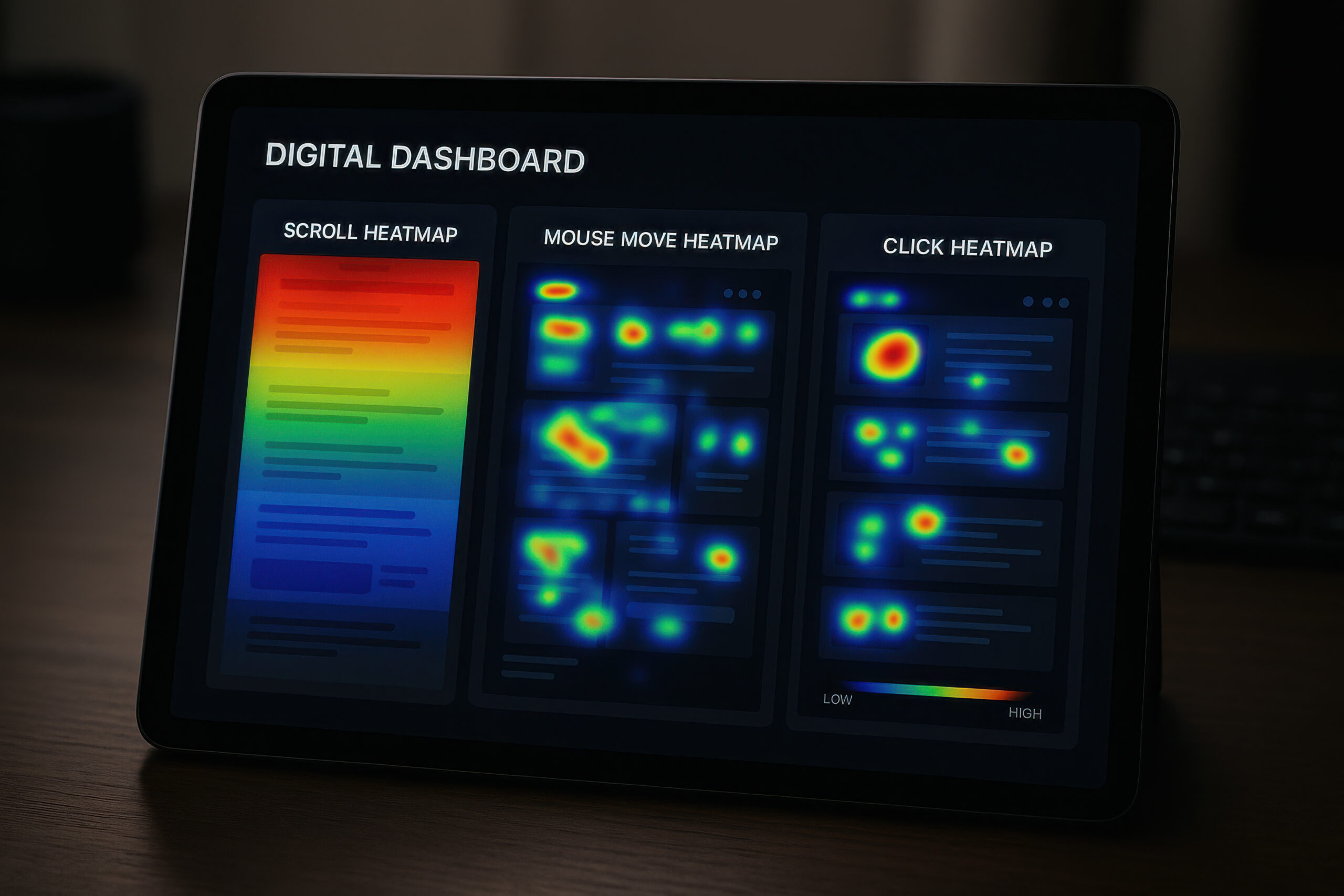
Heatmaps translate behavior into simple visuals. However, each heatmap answers a different question. Therefore, you should know what you are looking at before changing a page.
Click heatmaps
Click heatmaps show where users click on desktop and tap on mobile. Therefore, they reveal whether CTAs get attention. In addition, they expose “dead clicks” when users click non-clickable elements.
Scroll heatmaps
Scroll maps show how far users scroll and where drop-offs happen. Consequently, you can see whether your most important content appears too low on the page.
Move heatmaps
Mouse movement maps can reflect attention on desktop. However, they do not represent mobile behavior. Therefore, treat them as supporting data, not the main decision driver.
Session recordings
Recordings show real user journeys. Therefore, they help you identify confusion, hesitation, and repeated back-and-forth behavior.
Form analytics
Form tracking shows where users abandon fields, hesitate, or error. Consequently, you can reduce friction and improve lead capture.
Core User Behavior Metrics to Track
Heatmaps become more powerful when you pair them with measurable user behavior metrics. Therefore, track these signals consistently.
Engagement and flow metrics
- Engaged sessions: confirms that users actually interact, not just land and leave.
- Scroll depth: shows whether users reach key sections and CTAs.
- Time on page: adds context, especially when paired with scroll behavior.
- Exit rate by page section: reveals where clarity breaks down.
Conversion and intent metrics
- CTA click-through rate: measures whether calls to action earn attention.
- Form start vs form submit: exposes friction inside forms.
- Phone clicks or email clicks: matters for local and service businesses.
- Micro-conversions: includes pricing clicks, quote clicks, or “view services” clicks.
To connect these metrics to outcomes, you need clean GA4 events. Therefore, pair this work with GA4 Setup for SEO Success and Event Tracking.
How to Set Up Heatmaps and Behavior Tracking
Setup matters because messy tracking creates false conclusions. Therefore, keep the configuration simple and intentional.
Step 1: Define which pages matter most
Start with pages that already get organic traffic. Then focus on pages that drive leads or sales. Consequently, your improvements influence results faster.
Step 2: Track the right events
Track CTA clicks, phone clicks, form submissions, and key internal links. In addition, track scroll depth on long pages. GA4 event guidance from Google Analytics Help on events can support your setup.
Step 3: Validate tracking before you analyze
Test events on desktop and mobile. Then confirm they appear in GA4. Consequently, your heatmap insights align with real conversion reporting.
Step 4: Collect enough sessions for signal
Behavior data needs volume to stabilize. Therefore, avoid making decisions after a handful of sessions. Instead, collect enough visits to see repeat patterns.
A Practical Process for Analyzing Pages
You need a repeatable method so insights do not depend on opinions. Therefore, follow this process for each page.
Step 1: Define the page job
Decide the one action the page should drive. For example, it might be “book a call” or “request a quote.” Then judge everything against that job.
Step 2: Check intent alignment
Confirm the page matches the search intent. If users want a definition, provide one early. If users want a checklist, show it fast. Search Console helps you validate query intent. Therefore, use Google Search Console Reports That Matter to confirm what queries drive visits.
Step 3: Look for dead clicks and missed CTAs
If users click headings, icons, or images that are not links, you have a clarity problem. Therefore, either make the element clickable or adjust design cues.
Step 4: Identify scroll drop-offs
If most users stop before your best section, move that section up. Alternatively, add a summary earlier and link down. Consequently, more users reach value and next steps.
Step 5: Watch recordings for confusion loops
Look for repeated scrolling, re-reading, and backtracking. These patterns often signal unclear copy. Therefore, rewrite for clarity and shorter steps.
Step 6: Tie findings to a test plan
Choose one change at a time. Then measure before and after. Consequently, you know what actually improves conversions.
Actionable Fixes That Improve Clarity and CTA Performance
Heatmaps usually lead to a small set of high-impact fixes. Therefore, start with these proven improvements.
Move clarity above the fold
Add a clear promise and a clear next step near the top. Then support the promise with proof, examples, or a quick process. Consequently, users trust the page faster.
Reduce choice overload
If your page offers too many CTAs, users hesitate. Therefore, pick one primary CTA and one secondary option. Then make everything else supportive.
Use short sections and strong headings
Long blocks reduce scanning. Therefore, break content into sections under 300 words. In addition, use headings that describe the benefit or outcome.
Add internal “decision links”
When users scroll, give them shortcuts. For example, link to pricing, process, or FAQs. Consequently, users find answers faster.
Fix friction in forms
Remove unnecessary fields. Then add micro-copy that explains why you ask. As a result, more users complete forms.
Improve mobile layout stability
Mobile users abandon pages quickly when layouts jump. Therefore, stabilize spacing and keep buttons easy to tap. Core Web Vitals guidance from Web.dev supports these fixes.
Segment Behavior by Intent and Source
One page can serve multiple audiences. However, behavior differs by intent. Therefore, segment your analysis.
- New visitors vs returning visitors: returning users often convert faster.
- Branded vs non-branded queries: branded traffic usually shows higher trust.
- Mobile vs desktop: mobile scroll behavior often differs sharply.
- Top landing pages: each landing page may have a different job.
Segmentation keeps your changes accurate. Consequently, you avoid optimizing for the wrong audience.
Turn Insights Into Tests That Move Metrics
Behavior data becomes valuable only when it drives action. Therefore, convert findings into tests.
A simple testing framework
- Hypothesis: “If we move the CTA above the fold, CTA clicks will rise.”
- Change: make one clear adjustment, not five.
- Metric: track CTA click rate, form submit rate, and assisted conversions.
- Time window: compare two equal periods for stability.
For landing page improvements tied to paid traffic, you can also learn from PPC testing methods. Therefore, review Landing Pages for PPC Conversions when it fits your situation.
Related IMR Pages to Visit Next
- The 2025 SEO Blueprint: A Strategic Roadmap for Dominating Search Rankings
- SEO Analytics and Reporting: Tracking ROI with Google Search Console and GA4
- GA4 Setup for SEO Success and Event Tracking
- Google Search Console Reports That Matter
- How to Calculate SEO ROI and Prove Value
- On-Page SEO Best Practices: Optimizing Content for Keywords and User Intent
- Writing Title Tags, Meta Descriptions, and H1 Headings
Body Reinforcement
- Heatmaps show what users do, so you can fix real friction.
- Behavior metrics become actionable when they connect to events and conversions.
- Scroll drop-offs often signal that key value appears too late.
- Dead clicks reveal design cues that confuse users.
- Testing one change at a time builds trust in your optimization process.
- Segmenting by device and intent prevents misleading conclusions.
Common Questions
Do heatmaps directly improve rankings?
Heatmaps do not change rankings by themselves. However, they help you improve user experience and conversions. Therefore, they increase the business value of the rankings you already have.
How many sessions do I need before trusting heatmap patterns?
It depends on page traffic. However, you should wait until patterns repeat. Therefore, avoid decisions based on a small sample.
Should I focus on scroll depth or click data first?
Start with the page job. If the CTA is not clicked, prioritize clicks. If users never reach key content, prioritize scroll. Consequently, your work stays aligned with outcomes.
Why do mobile heatmaps look different from desktop?
Mobile users scroll more and tap differently. In addition, screen size changes how content appears. Therefore, always analyze mobile separately.
What is the biggest mistake teams make with behavior data?
They change too much at once. Therefore, they cannot prove which change helped. Instead, test one clear adjustment at a time.
Next Steps
First, choose three high-traffic SEO landing pages. Next, implement basic event tracking for CTAs and forms in GA4. Then, collect heatmap and recording data until patterns repeat. After that, apply one clarity improvement at a time and measure impact. Consequently, your SEO traffic will convert better while your reporting becomes easier to defend.







